If you send small-parcel shipments to Amazon FBA, every box carries two labels: the carrier label (UPS, FedEx or another small-parcel carrier) and the FBA box ID label. The carrier label gets the box to the fulfillment center. The FBA box ID label tells Amazon what is inside it.
Shipping small batches to Amazon FBA or Walmart WFS? Get a prep quote. No monthly minimum on FBA and WFS prep.
Small sellers mix these up more than you'd think, especially on a shipment of three or four boxes where it's tempting to treat the labels as interchangeable. They aren't. Here's how box ID labels work and how to get them right.
What the FBA box ID label actually is
Amazon calls it by several names: FBA box label, carton label, shipment box label, carton ID or box ID. Whatever the name, it is a label unique to one box.
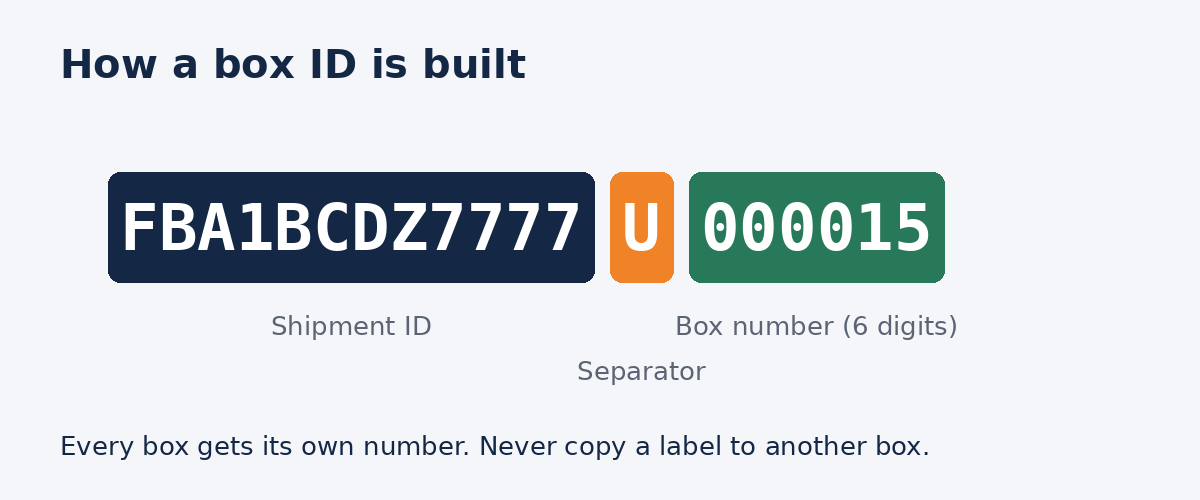
Each label carries the shipment ID, the letter U and a six-digit box number. In Amazon's own example, box 15 of shipment FBA1BCDZ7777 is identified as FBA1BCDZ7777U000015. When you provide box content information while creating the shipment, the barcode on each label is tied to what you said is in that particular box: SKUs, quantities, expiration dates if applicable, and the box's weight and dimensions.
That's the key idea. The label is not just "this belongs to shipment X." It is "this is box 3 of shipment X, and it contains these exact units."
Why a wrong label matters
Amazon's label guide is direct about the consequences. Boxes without proper box ID labels can lead to:
- denied reimbursement claims,
- units received incorrectly,
- delays in receiving, and
- blocks on your ability to create shipments.
It also notes that when a box's physical contents don't match what was announced for it, receiving delays follow.
The rules that trip up small shipments
One label per box, never copied
Each box gets its own label with its own number. Amazon specifically warns against photocopying, reusing or modifying a label to use on another box. If you have two boxes with identical contents, they still need two different labels: U000001 and U000002.
The label must match the box it's on
Because each barcode is tied to specific contents, the label has to go on the box you packed to that plan. If you packed box 1 with 12 units of SKU A and box 2 with 8 units of SKU B, swapping the labels means both boxes are now wrong, even though the shipment total is right.
Changed the plan? Reprint the whole set
If you change the number of boxes or what's in any box after you've printed labels, Amazon says to reprint the entire set of labels for the shipment. Don't patch it with one new label and keep the old ones. Discard every label from the earlier print.
Carrier label alone is not enough
A carrier label, a pallet label or a 2D barcode label on its own is not sufficient. Every small-parcel box needs its FBA box ID label alongside the carrier label.
Master cartons get one label on the outside
If you ship multiple case packs inside a master carton, Amazon says to put the FBA box ID label on the master carton. The case packs inside don't need their own box ID labels.
Printing labels that scan
A correct label that won't scan still causes trouble. Amazon's guidance for box labels:
- Size: Supported labels are at least 3 1/3 x 4 inches. With a thermal printer, you can choose the 4 x 6 inch thermal format when printing box labels.
- No scaling: If your print dialog tries to fit or scale the PDF, set scaling to None or 100%.
- Print quality: Amazon recommends thermal or laser printers at 300 DPI or higher, and suggests periodically test-scanning labels and cleaning or replacing print heads. Smeared, faded or streaky barcodes are a common reason labels fail.
- Uncovered: Don't tape over labels or put them in a plastic pouch.
If you print on a 4x6 thermal printer and have a label PDF laid out for a different page size, our free thermal label converter can help reformat it. Always test-scan a converted label before it goes on a box.
For placement, Amazon says to apply both labels flat on a side of the box, away from seams, edges and corners, and to remove or cover old labels on reused boxes. We covered placement in more detail in our FBA box size and weight limits guide.
A five-minute routine for small shipments
This is the order we'd suggest for a shipment of a few boxes:
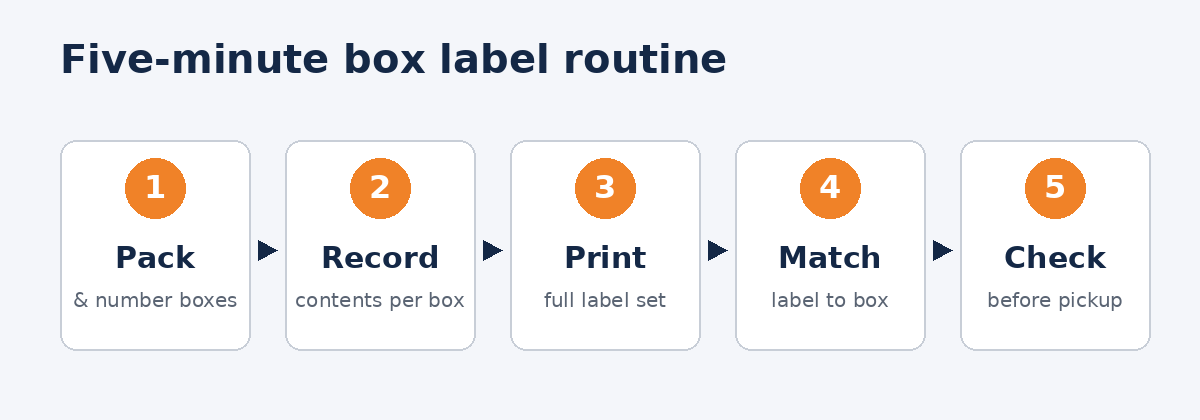
- Pack first, then finalize the plan. Pack and weigh each box, and number them with a marker on a spot that won't be labeled.
- Enter box contents to match the physical boxes. SKUs, quantities, weights and dimensions per box, using your box numbers.
- Print the full label set once the plan is final. If anything changes afterward, reprint everything.
- Match label to box by number. Label U000001 goes on box 1, and so on. Check one SKU in each box against your plan before sealing.
- Check before pickup. Each box should have exactly one FBA box ID label and one carrier label, both flat, uncovered and scannable, and no old labels showing.
Taking a quick photo of each sealed, labeled box is also worth the few seconds. If a box is ever received short, you'll have a record of what was shipped and how it was labeled.
Want help with your next small shipment?
PrepToShip does small-batch FBA and WFS prep for sellers anywhere in the US and overseas sellers shipping into US fulfillment centers. Turnaround is typically 24–48 hours, with photos at every step. There's no monthly minimum on FBA and WFS prep, and labeling fees are waived on your first 100 units (add-ons billed normally). Start here when you're ready to send a test shipment.