You sent 120 units in four small-parcel boxes. The shipment closes, and the Contents tab says Amazon received 112. For a small seller, eight missing units can wipe out the profit on the whole shipment, so it is worth handling calmly and in the right order.
Shipping small batches to Amazon FBA or Walmart WFS? Get a quote No monthly minimum on FBA and WFS prep.
This guide walks through how Amazon's inbound reconciliation works for US FBA shipments, when you can actually ask for an investigation, and what records make the process easier. It does not promise you will be reimbursed. Amazon decides that case by case.
Why units look missing before they are
Most shortages you see early are not real shortages yet. Boxes in a small-parcel shipment often arrive on different days, and receiving at the fulfillment center can trail delivery. A shipment can sit at Delivered or Checked in while units are still being counted.
Amazon's Reconcile your shipment help page says reconciliation of shipped inventory usually takes 2 to 30 days and in some cases up to 60 days. That is why opening a case the day after delivery rarely helps.
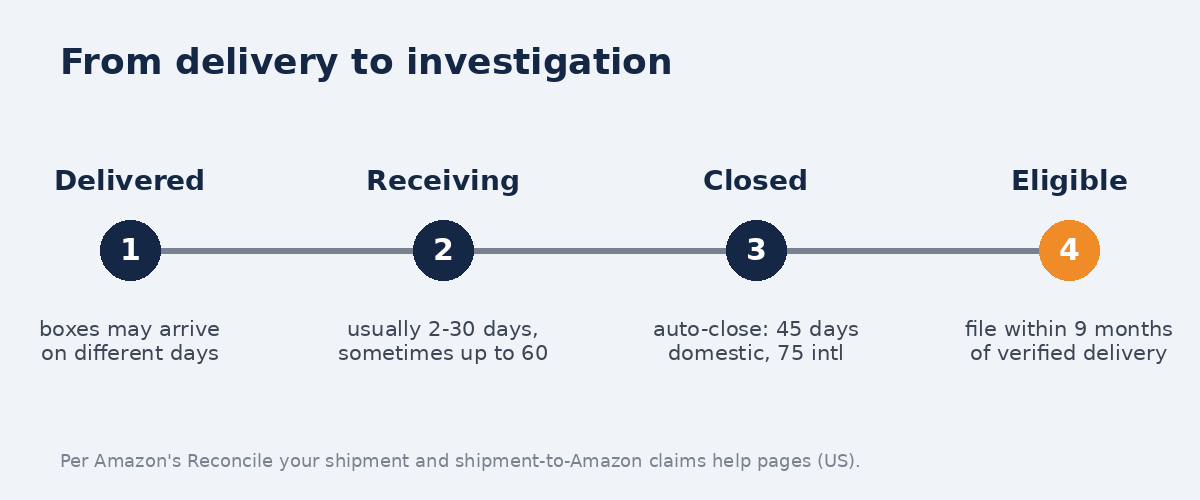
When a shipment closes
Per the same help page, a shipment is only eligible for reconciliation once its status is Closed. Shipments created after February 1, 2024 are closed automatically after 45 days for domestic shipments and 75 days for international ones, if they have not already closed because all expected units were received.
For an overseas seller shipping into US FBA, keep the longer international window in mind before you assume something went wrong.
Step 1: Check the Contents tab first
Open the shipment in your shipping workflow and go to the Contents tab. It shows, line by line, what your shipping plan listed and what the fulfillment center recorded. Look for:
- Which SKUs are short, not just the total. A shortage on one SKU and an overage on a similar one often points to a labeling mix-up rather than lost units.
- Status per line. When a line becomes eligible for investigation, Amazon shows that in the Status column.
- Box-level patterns. If every missing unit came from the same box, that box's tracking and contents are where to look.
Step 2: Rule out the common causes on your side
Before you file, compare your own records with what Amazon recorded. The usual causes on the seller side are:
- Wrong FNSKU on some units. A unit labeled with a different variant's FNSKU gets received as that variant. Your total may be right while individual SKUs are off.
- Unscannable labels. Smudged, wrinkled or covered barcodes slow receiving and can lead to units being handled as problems.
- Box contents that don't match. If you moved units between boxes after printing labels, the box contents information no longer matches what is inside.
- A box that hasn't been delivered. Check carrier tracking for every box, not just the first one.
If you find the cause on your side, fix it on the next shipment. Filing a claim for a mislabel usually just adds time.
Step 3: Check your Reimbursements report
Amazon's FBA inventory reimbursement policy for shipment to Amazon claims asks sellers to confirm the shipment's contents match the shipping plan and to check the Reimbursements report before filing, in case the units were already reimbursed. Do this before opening anything new so you don't duplicate a claim.
Step 4: File inside the window
According to that same policy, once the shipment shows as eligible for investigation on the Contents tab, you can file a claim, and you must submit it no later than nine months after the verified delivery date to the fulfillment center. Claims for lost units go through the Contents tab. Claims for damaged units go through Contact Us in Seller Central.
Note that the clock starts at verified delivery, not at the date the shipment closed. Put a reminder on your calendar for each shipment instead of relying on memory.
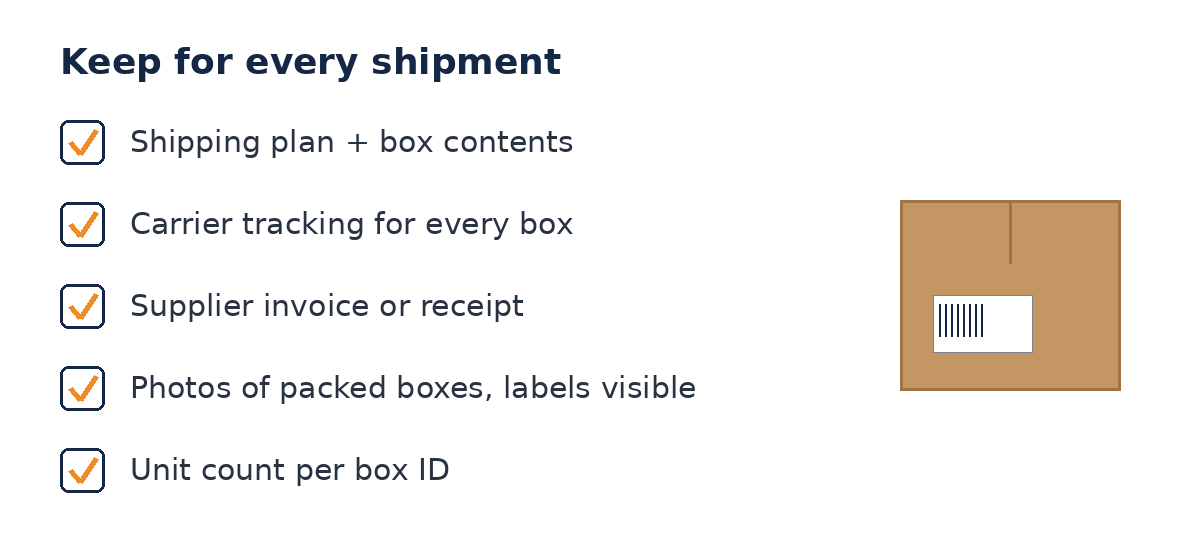
What to keep for every shipment
Amazon may ask for supporting documents during an investigation. Small sellers rarely have a system for this, so here is a simple one that works for a batch of any size:
- Your shipping plan and box contents as submitted, saved as a PDF or screenshot.
- Carrier tracking for every box, with delivery confirmation.
- Proof of inventory, such as the supplier invoice or receipt for the units you sent.
- Photos of the packed boxes showing units and labels before sealing, with the box ID label visible.
- A unit count per box written down at packing time, not reconstructed later.
Keep these in one folder named with the shipment ID. When a shortage shows up months later, you will not be digging through email.
Prevent the next shortage
Most reconciliation pain starts at the prep bench. A few habits cut it down:
- Label one SKU at a time, and clear the bench before starting the next.
- Scan a sample of finished FNSKU labels before packing.
- Count units into each box and record the count against the box ID.
- Photograph each open box before it is sealed.
- Don't reuse boxes with old shipping labels or barcodes still showing.
None of this guarantees Amazon will never lose a unit. It does mean that when a number is off, you can quickly tell whether the gap is on your side or theirs, and you have the records to back up a claim.
Need a hand with small batches?
PrepToShip preps small FBA and WFS shipments for sellers anywhere in the US and overseas sellers sending stock into US fulfillment centers. Turnaround is typically 24–48 hours, with photos at every step and unit counts per box, and there is no monthly minimum on FBA and WFS prep. Labeling fees are waived on your first 100 units (add-ons billed normally). Start your first shipment.
Know your cost before you ship
Small-batch Amazon FBA and Walmart WFS prep, with no monthly minimum on FBA and WFS prep.
Get a quote