A small FBA shipment can be packed perfectly and still get slowed down at receiving because of one thing: the unit label. If the fulfillment center can't scan the right barcode quickly, the unit may need extra handling, and you end up chasing inventory that "should" be there.
The good news is that FNSKU labeling is one of the most controllable parts of prep. This checklist walks through what Amazon asks for and the habits that keep small shipments clean.
First, confirm which barcode the SKU uses
Before you print anything, check the barcode setting for the SKU in Seller Central. Amazon tracks inventory with either a manufacturer barcode (UPC, EAN, JAN or ISBN) or an Amazon barcode, the FNSKU, which usually starts with "X00" for most products.
Amazon updated its barcode rules for inventory sent on or after March 31, 2026. Under the change, resellers generally need Amazon barcodes even when a product already has a manufacturer barcode, while eligible Brand Registry brand owners can still use manufacturer barcodes on eligible products. Amazon also requires its own barcode for items like used-condition products, products without a scannable manufacturer barcode, and certain consumable or topical products.
Don't rely on what worked for a shipment six months ago. Check the setting for each SKU before you prep the next batch.
Print labels Amazon can actually read
Amazon's seller guidance lists a few simple print specs for the labels you apply yourself:
- Size: 1 to 2 inches tall and 2 to 3 inches wide.
- Ink and paper: black ink on non-reflective paper with an adhesive backing.
- Printer: Amazon suggests a laser printer at 300 DPI for best results. Thermal label printers are also widely used for FNSKU labels; what matters is a crisp barcode that doesn't smudge or fade.
- Content: the scannable barcode, the FNSKU number, the product title and the condition (for example, New).
Amazon does not accept damaged or photocopied labels. If a label prints faded, streaky or cut off, reprint it rather than hoping it scans.
A quick print check
Before you label a whole batch, print one sheet or roll section and look at it closely. Are the bars sharp, with clear white space around the barcode? Does the title match the product in front of you? Catching a wrong template or a misaligned sheet on the first label is far cheaper than relabeling 80 units.
If you have Amazon labels formatted for letter-size sheets and want to print them on a thermal printer, our free thermal label converter can help reformat them.
Place the label where a scanner can see it
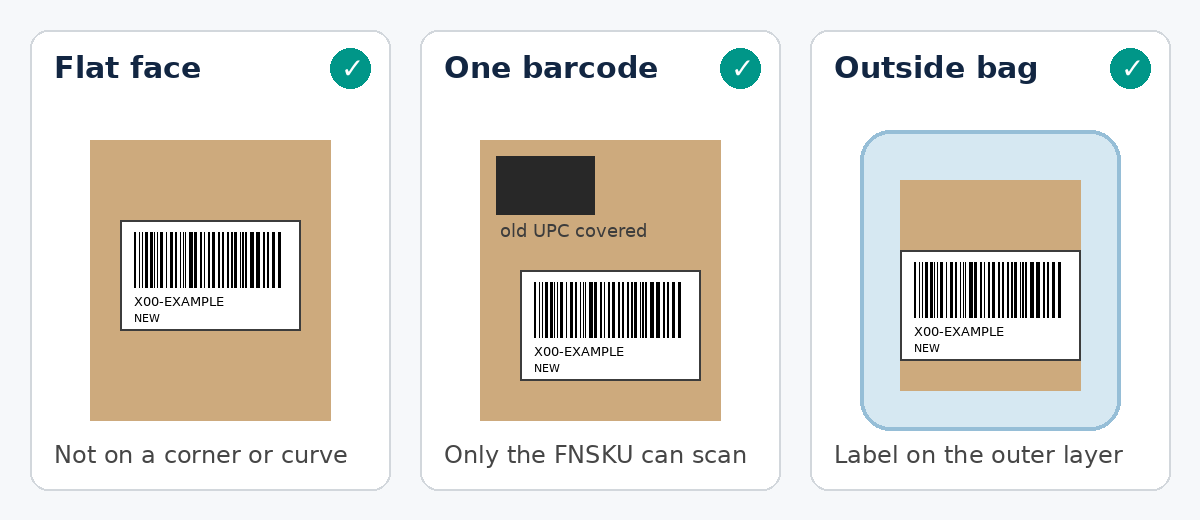
Placement is where most avoidable problems happen. Amazon's rules are straightforward:
Use a smooth, flat surface
Put the label on a flat face of the product or package. Avoid corners, edges and curves, where the barcode bends and becomes harder to scan. On round items like bottles, find the flattest area you can, or bag the item and label the bag.
Leave only one scannable barcode
If the SKU uses an Amazon barcode, cover the other scannable barcodes on the unit, such as the UPC, EAN, ISBN or an old FNSKU, so only the FNSKU can be scanned. Amazon's guidance says to leave serial-number barcodes and Transparency labels visible; a Transparency code must not cover or be covered by another label.
Check every side of the finished unit, not just the side you labeled. Barcodes hide on the bottom of retail boxes, on multipack sleeves and on supplier stickers.
Label the outermost layer
If the unit needs a polybag, bubble wrap or other extra packaging, the FNSKU goes on the outside of that final layer. A label sealed inside a bag, or blurred by wrinkled plastic, may not scan. Smooth the bag flat where the label goes, and keep tape and seams off the barcode.
Don't forget the shipping box
Unit labels aren't the only barcodes that matter. Before a carton goes to Amazon, remove or cover any old barcodes on the outside of the box. Amazon suggests covering them with opaque tape or marking them out with a black marker so they can't be scanned by mistake. Reused supplier boxes are the usual culprit.
A simple routine for small batches
For small shipments, a consistent routine matters more than speed:
- Match before you peel. Compare the product title and condition on the label to the item in your hand.
- Label one SKU at a time. Keeping only one SKU and one set of labels on the table prevents mix-ups between similar-looking variations.
- Do the final bag or wrap first, then label. That way the barcode ends up on the outer layer.
- Scan a few units. A cheap handheld or phone barcode app can confirm that the label scans as the FNSKU and that no other barcode is still readable.
- Take photos. A quick photo of labeled units and packed cartons gives you a record if a receiving discrepancy comes up later.
When to hand it off
If labeling is eating the hours you'd rather spend sourcing, outsourcing it can make sense, but only if the prep partner is transparent about what they do. At PrepToShip, we focus on prep and labeling for small FBA and Walmart WFS shipments from Northern Virginia. Every order gets photos at each step: when it arrives, after labeling and prep, and when it's packed and shipped.
We typically turn small shipments around in 24–48 hours, there's no monthly minimum on FBA and WFS prep, and labeling fees are waived on your first 100 units (add-ons are billed at normal rates). If that sounds useful, request a quote and tell us what you're sending.