A removal order is easy to create and easy to forget. The units leave Amazon, land somewhere, and then sit in a corner because nobody planned what happens next. For a small seller, that's where the money is: a removal only pays off if the units that come back get sorted, fixed where possible, and either resold or sent back in clean.
Shipping small batches to Amazon FBA or Walmart WFS? Get a quote No monthly minimum on FBA and WFS prep.
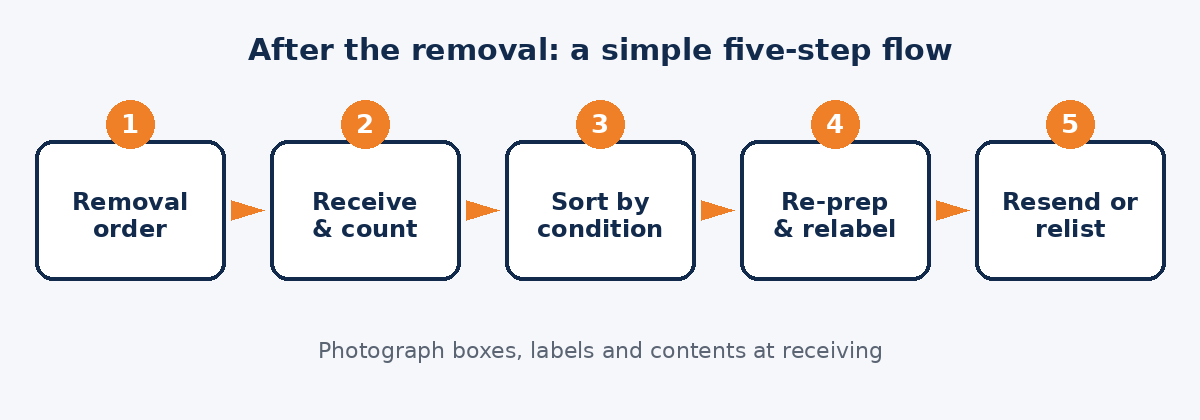
This guide covers the part after you click "Create removal order": what to expect on timing and fees, how to sort what arrives, and how to re-prep units so a second inbound goes smoothly.
Before you create the removal
Know how the fee is charged
Amazon charges removal and disposal fees per unit. Since March 1, 2026, Amazon charges those fees as each unit is removed or disposed of, rather than all at once when the whole order completes. The rates themselves didn't change with that update. You can see shipment-level charges, and when units were removed, under Payments > Transaction view in Seller Central. Check the current FBA removal order fee page for live rates before you budget, because rates are set by size tier and shipping weight and can change.
Watch the aged inventory date
Amazon assesses its aged inventory surcharge using a snapshot on the 15th of each month. Amazon says that if you submit a removal or disposal order by 11:59 p.m. Pacific Time on the 14th, those units won't incur that month's surcharge, even if they haven't physically left the fulfillment center yet. If you're removing slow stock anyway, submit before the 14th rather than after.
Plan for slow and split deliveries
Removals are not fast. Processing times vary, and peak season (Prime Day, Black Friday through the holidays) can stretch them a lot. Amazon also often ships one removal order as several separate shipments, each with its own tracking number. Write down the removal order ID and the requested quantity per SKU before anything arrives, so you have something to reconcile against. If a removal shows "Completed" but the count looks short, see our guide on reconciling removal orders that seem to be missing units.
When the boxes arrive
Receive against the order, not the box
Open every box from a removal and count by SKU, then compare against the removal order, not against the packing slip in one box. Track which tracking number each unit came from. If something is short, you want that evidence before you open a case.
Take photos as you go: the outside of each box, the shipping label, and the contents laid out. Photos are cheap and they settle a lot of later questions.
Sort every unit into one of four piles
A simple system beats a clever one. Give each unit one of four outcomes:
- Sellable as is. Packaging intact, no damage, no stickers you can't cover. These can go back to FBA or to another channel.
- Fixable. The product is fine but the packaging isn't: a torn polybag, a scuffed box, a missing or damaged label, a customer return sticker over the barcode. These need re-prep.
- Other channel. Units that are fine but shouldn't go back to Amazon, for example an open-box item that a marketplace like eBay allows you to sell with an honest condition description.
- Not worth recovering. Broken, missing parts, or worth less than the labor and shipping to save them.
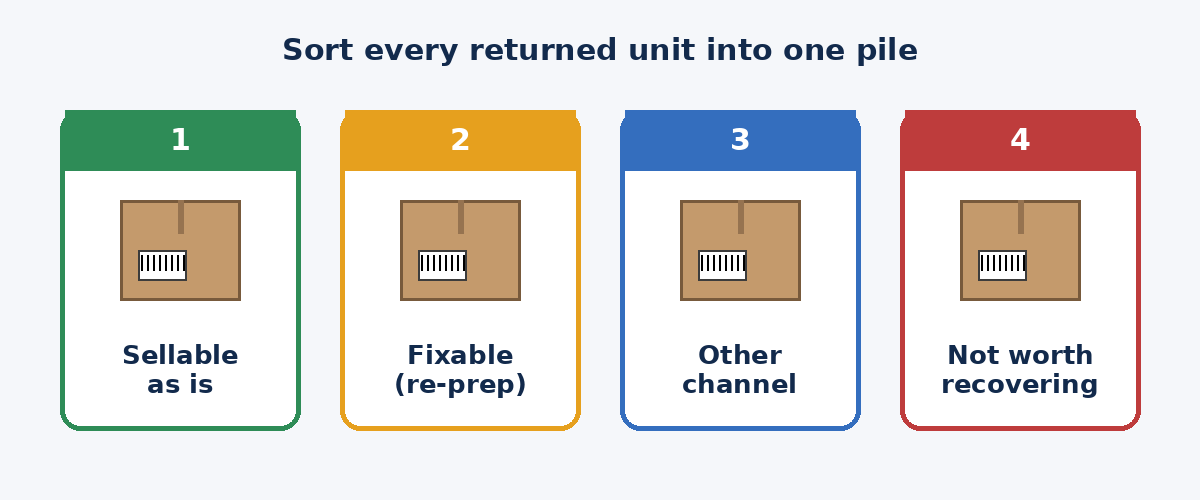
Be honest with pile 1. If a unit has been opened, used or damaged, don't put it back in a new-condition FBA shipment.
Re-prep before you resend
Units that come back from a removal often have extra stickers, old labels and worn packaging. Before any of them go back to FBA:
- One scannable barcode per unit. Cover or remove every other barcode on the outside: old FNSKU labels, removal stickers, any return barcodes. A unit that shows two scannable barcodes can be scanned wrong at receiving.
- Fresh FNSKU labels. Print new labels for the current listing instead of trusting old ones. Confirm the FNSKU matches the SKU and condition you're sending.
- Replace worn prep. If the item needs a polybag or bubble wrap, a torn or cloudy bag should be replaced, with the label outside the bag and readable. Our polybag and bubble wrap guide covers the details.
- Check dates. Expiration-dated products may have aged while at Amazon and in transit. Recheck dates against the expiration date rules before deciding they're sellable.
Resend in a clean, small batch
Treat the resend as a fresh inbound shipment, not a continuation of the removal:
- Create a new shipment plan for only the units you've cleared.
- Pack each box with matching contents and print a new, unique box ID label for every box. Old box labels from the removal must be removed or covered.
- Keep within carton size and weight limits; see our box size and weight guide.
- Keep a simple sheet: removal order ID, units received, units per pile, units resent, and the new shipment ID. That one sheet makes the next reconciliation easy.
The candid math
Not every removal is worth doing. Before you create one, estimate what each unit is worth after removal fees, inbound or outbound shipping, re-prep labor and the selling fees on whichever channel it ends up on. If the number is close to zero, disposal or liquidation may be the more honest choice. If it's clearly positive, plan the receiving and sorting before the boxes leave Amazon.
Need a hand with the re-prep?
PrepToShip does small-batch prep for sellers anywhere in the US and overseas sellers shipping into US FBA and WFS, typically with 24–48h turnaround and photos at every step. There's no monthly minimum on FBA and WFS prep, and labeling fees are waived on the first 100 units (add-ons are billed normally). Start here.
Know your cost before you ship
Small-batch Amazon FBA and Walmart WFS prep, with no monthly minimum on FBA and WFS prep.
Get a quote